

PTraffic 1.6 Changes
PTraffic, PTraffic Pro, and PTraffic ProPlus will be available in version 1.6 from 26 November 2025. Below is a list of the changes for the various PTraffic versions.
Important note
Before loading projects from version 1.5 or older, it is essential to make a backup copy of the project folder.
Version 1.6 uses the Unicode character set instead of the ANSI character set. Projects from previous versions are automatically converted when loaded. Projects created or edited with version 1.6 or later should not be edited again with a previous version (1.5 or older).
Conversion to Unicode character set
In contrast to the previous versions, which work with the ANSI character set, the Unicode character set is used from this version onwards. Projects from the previous version(s) are automatically adapted.
Difference between ANSI and Unicode character set
The ANSI character set contains 256 characters (letters, numbers, etc.). Of these, 128 are internationally identical and a further 128 are country-specific (e.g. the umlauts ä, ü, ö).
The Unicode character set can theoretically represent over a million characters. Currently, over 150,000 of these characters are used and the characters of most countries are integrated.
Information on conversion
To be on the safe side, you should make a copy of the project folder before loading a project that was created with a previous version.
Before loading the project, you will be asked whether you want to convert to Unicode and load the project.
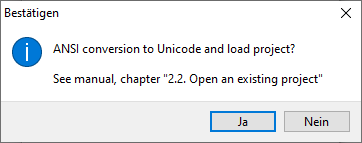
If you select “No”, the project will not be loaded.
If you agree to the conversion to Unicode, the project files are converted to Unicode files and are only compatible with the previous program versions to a limited extent. When loading Unicode projects with previous program versions, characters are sometimes displayed incorrectly (e.g. ä,Ä,ö,Ö,ü,Ü,ß).
Edit stations
A multi-line input field is now available for new stations so that you can enter several new stations at once. You can also copy station texts from other applications and paste them here.
Line network plans (PTraffic Pro/ProPlus)
Network maps → New/Change:
In addition to images in Windows bitmap format (BMP), images in GIF and JPG format can now also be selected as background images.
Edit network → Edit line:
- Bug fixed: When deleting lines, an error message occasionally appeared and not all relevant files may have been deleted.
- Error fixed: When selecting “New”, stations of the (changed) line were still displayed if you had previously selected “Change”.
- Bug fixed. Previously, if you started drawing a new line with ‘Start’ and immediately clicked “Stop” again, an error message was displayed and the ‘Stop’ button remained activated.
Edit network → Edit stations:
- Stations can now also be positioned using the mouse. The mouse buttons have the following functions:
- Left-click: Positions current station at mouse position.
- Left double-click: Positions the current station at the automatically determined position.
- Double-click: Selects next station.
- If stations are not activated, the cursor is now red instead of black. In addition, the cursor can now also be moved along the line for stations that are not activated.
- With the “Auto” button, the current station is placed at the automatically determined position as with the left double-click.
- The automatic positioning of all stations not yet positioned with “Distribute stations” has been optimized. Stations that already exist on another line are placed directly in the correct position in most cases.
- The cursor can now also be moved to stations that are not activated on the line.
- Bug fixed: After selecting “Edit stations” for lines that had not yet been created, error messages previously appeared when selecting “Edit line”.
Edit network → Transfer stations:
Transfer stations are now always displayed in alphabetical order.
Output network map (PTraffic ProPlus):
- Bug fixed: Occasionally, station texts were aligned diagonally instead of horizontally
- Bug fixed: Previously, the station text was occasionally not placed correctly at transfer stations.
Timetable information
- PTraffic Pro/ProPlus: The option ‘Show connections with redundant routes’ has been removed from the filter.
- Bug fixed: Some connections were not displayed.
Timetable information → Pictorial timetable:
Bug fixed: Station text was sometimes drawn into the diagram
Timetable information → Connection timetable:
Bug fixed: The connection timetable sometimes had display errors (incorrect text colours, station texts were drawn twice, indentation of departure or arrival times).
Manual
The changes have been included in the updated LineMap Draw manual. In addition, all changes to the previous version are described in a separate section.
The manual has also been revised and additional chapters have been added. So that users of the previous version can find the changes more quickly, the relevant sections have been marked with an “update symbol”.
The updated manuals in PDF format can be downloaded here:
PTraffic ProPlus: PTraffic_ProPlus_1_6_Manual.pdf
PTraffic Pro: PTraffic_Pro_1_6_Manual.pdf
PTraffic PTraffic_1_6_Manual.pdf